ShineOn Message Card Canva Template: A Smart, Scalable Tool for Jewelry E-commerce Brands
If you sell ShineOn jewelry—or any fine or fashion jewelry—and rely on thoughtful packaging to elevate the unboxing experience, then your message card isn’t just a footnote. It’s a silent salesperson. A brand ambassador. A moment of connection between your business and the person holding that delicate necklace or stackable ring in their hands.
That’s why the ShineOn Message Card Canva Template was created—not as a generic design pack, but as a purpose-built solution for e-commerce sellers who need consistency, speed, and emotional resonance—without sacrificing professionalism or brand voice.
Why This Isn’t Just Another Canva Template
When you search “jewelry message card template” on Creative Fabrica or elsewhere, you’ll find dozens of options. But most are either overly decorative (hard to customize), too minimal (lacking warmth), or built for print-on-demand platforms with rigid sizing—not tailored specifically for ShineOn’s signature card dimensions and aesthetic language.
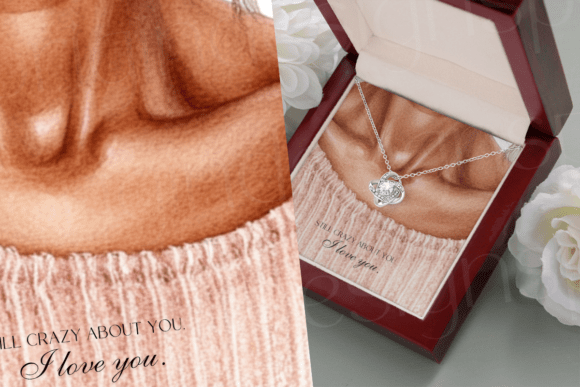
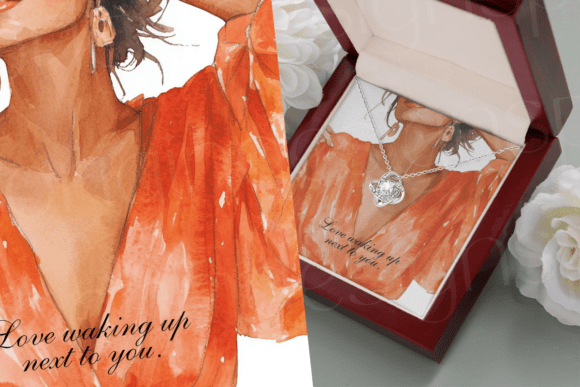
The ShineOn Message Card Canva Template fills that gap precisely. Designed by a working jewelry brand designer who launched these templates on Creative Fabrica in 2022, every layout reflects real-world usage: clean margins for bleed-free printing, optimized typography for legibility at small sizes, and intentional white space so handwritten notes or QR codes still have room to breathe.
It’s not about swapping fonts and colors—it’s about having a starting point that already feels like ShineOn: elegant but approachable, modern but timeless, personal without being cutesy.
Who Benefits Most—and How
This isn’t a one-size-fits-all resource. Its value multiplies depending on how you work—and what stage your business is in.
- E-commerce store owners who ship daily can batch-create cards for seasonal launches, limited editions, or holiday bundles—no more last-minute Canva panic before a Shopify order surge.
- Print-on-demand (POD) sellers integrate these directly into their workflow: upload to Printful or Gelato, pair with custom packaging, and maintain cohesive branding across products—even when fulfillment happens off-site.
- Small-batch artisans use the templates to build anticipation: drop a “sneak peek” version on Instagram Stories with a soft launch message, then swap in the final design once inventory goes live.
- Dropshippers streamline customer touchpoints—adding warmth to otherwise transactional interactions without investing hours in graphic design.
You’re not buying pixels. You’re buying time, polish, and peace of mind.
What You Get—And What You Don’t
The ShineOn Message Card Canva Template is delivered as a digital download—no physical item ships. Inside, you’ll find:
- Multipage Canva files pre-sized for ShineOn’s standard 3.5" × 2" message card (with safe zones and crop marks)
- Layered, editable text boxes—no flattened graphics or locked elements
- Font suggestions (with free alternatives listed) so your edits render correctly, even if you don’t own premium typefaces
- Color palette guidance based on common ShineOn metal finishes (rose gold, sterling silver, yellow gold)
- Optional add-ons: matching thank-you tags, mini care instruction inserts, and social media QR code placeholders
Here’s what’s clearly not included—and why it matters:
- No resale rights. You may not resell the template file itself, share it as a freebie (digital or printed), or list it on Etsy/Canva Marketplace as your own. That protects both the original creator and buyers who expect exclusivity in their toolkit.
- No commercial license for digital redistribution. If you run a design agency or offer branding services, you can’t bundle this into client deliverables as a standalone asset.
- Yes—printed hard copies are allowed. Once you’ve customized and printed the card, you may include it with physical orders, sell finished packaged sets, or use it in retail displays. That flexibility supports real business models—not theoretical ones.
Real-World Use Cases That Move the Needle
Let’s get practical. Here’s how smart sellers actually apply the ShineOn Message Card Canva Template beyond “just adding a note.”
Scenario 1: The Pre-Launch Tease
A boutique launches a new birthstone collection next month. Instead of waiting until launch day, they drop a teaser card using the template—“Coming Soon: Your September Stone, Curated With Care”—printed on textured ivory stock and slipped into current orders. Customers snap photos. Tag the brand. Build organic buzz.
Scenario 2: The Post-Purchase Nudge
An online jeweler adds a subtle QR code to the bottom corner of their customized card—linking to a private video thanking the buyer *by name*, showing how the piece was crafted, and inviting them to join a VIP loyalty group. Conversion lifts—not because of flash, but because of felt attention.
Scenario 3: The Gifting Upgrade
During Valentine’s Day, they layer two versions of the same template: one for the recipient (“For the One Who Makes My World Shine”), another for the giver (“You Picked Perfectly”). Same file. Two messages. One emotional payoff.
Design Integrity Meets Business Practicality
Some designers obsess over aesthetics alone. Others chase speed at the cost of tone. The ShineOn Message Card Canva Template balances both—because in jewelry, trust is built in micro-moments.
Think about it: When someone opens a box and sees a card that matches the font on your website, echoes the warmth of your email sign-off, and uses the same accent color as your Instagram highlights—they don’t think, “Nice design.” They think, “This brand gets me.”
That perception doesn’t happen by accident. It happens when your message card isn’t an afterthought—it’s part of your content strategy. And with these templates, it becomes repeatable, scalable, and deeply aligned.
You’re not outsourcing creativity—you’re removing friction from execution. So you spend less time wrestling with alignment guides and more time writing words that matter.
Getting Started Is Simpler Than You Think
No design degree required. No monthly Canva Pro subscription needed (though it helps). Just open the file in Canva, double-click any text block, and start editing. Swap names, dates, quotes, or calls-to-action in seconds.
Prefer handwriting? Leave designated lines blank—or use the template’s subtle line art as a guide for penmanship. Want to add a tiny logo? There’s a placeholder spot sized for ShineOn’s official mark or your shop’s monogram.
And because it’s built for real printers—not just screen previews—the file includes CMYK-ready layers and PDF export tips to avoid color shifts in production.
So if you’ve ever thought, “I wish I had something beautiful, on-brand, and ready to go”—the ShineOn Message Card Canva Template isn’t just available. It’s waiting to become part of your operational rhythm.
Not as decoration. As intention made tangible.