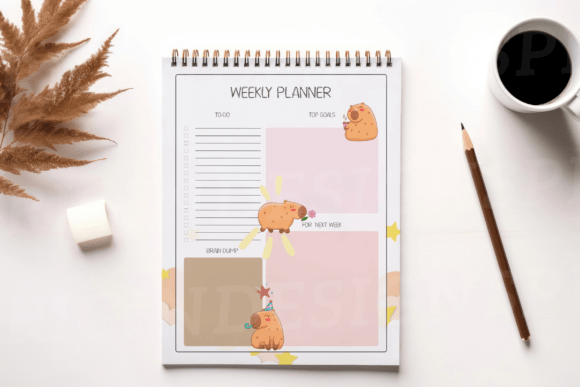
Planner - Weekly - Student
If you’ve ever stared at a blank page wondering how to fit lectures, lab reports, group meetings, gym sessions, and that one coffee catch-up into the same 168 hours—this is the tool that changes the rhythm of your week. Planner - Weekly - Student isn’t built for perfectionists or productivity gurus. It’s designed for real students: those juggling asynchronous Zoom calls and in-person seminars, revising for midterms while coordinating club events, and trying to remember whether “Group Project Draft” is due Tuesday or Thursday.
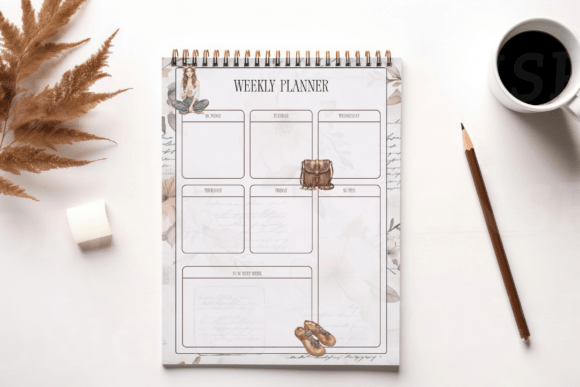
Visually, it balances clarity with warmth. The layout uses generous white space—not as empty filler, but as breathing room between time blocks and task lists. Headers are clean and legible, with subtle typographic hierarchy: class names sit in a sturdy sans serif weight, deadlines appear in a slightly bolder variant for quick scanning, and personal notes use a friendly, rounded secondary typeface that feels approachable—not childish, not clinical. There’s no visual noise: no clipart distractions, no forced motivational quotes, no rigid grids that make you feel like you’re filling out tax forms. Just intentional structure, calibrated for cognitive load.
More Than a Schedule—It’s a Cognitive Anchor
Research in educational psychology shows that externalizing commitments—writing them down in a consistent, spatially organized format—reduces working memory load. That’s why Planner - Weekly - Student works: it transforms mental clutter into a tactile, glanceable map. You’re not just logging tasks—you’re building situational awareness. When your Wednesday looks like three back-to-back seminars followed by a 90-minute study block and a 7 p.m. rehearsal, seeing it all on one page lets you spot friction points *before* they become crises. That 30-minute buffer between classes? Perfect for reviewing flashcards. That open slot Friday afternoon? Ideal for drafting that annotated bibliography before weekend plans take over.
The three included designs aren’t arbitrary variations—they reflect different decision-making styles. One emphasizes time blocking with vertical hour markers; another prioritizes task completion with checklists aligned to each day; the third integrates weekly goals and reflection prompts at the bottom, supporting metacognitive habits without demanding journaling discipline. All three share the same underlying logic: reduce friction between intention and action.
Designed for Real-World Flexibility
This isn’t a planner locked into academic calendars or semester rhythms. Its PDF format means it prints cleanly on standard letter or A4 paper—and scales gracefully whether you’re using a home inkjet, an office laser printer, or a local print shop. The file includes crop marks and bleed-safe margins, so if you choose to bind multiple weeks into a custom notebook or produce physical copies for a student cohort, alignment stays precise. And because it’s vector-based (not rasterized), enlarging sections for accessibility—or shrinking them for a compact pocket version—preserves sharpness.
For creators and small businesses, the licensing model is straightforward: personal use, print-on-demand fulfillment, and POD dropshipping are fully permitted. What’s excluded is redistribution—whether as a free download, bundled asset pack, or resold digital file. That boundary protects both the integrity of the design and the sustainability of thoughtful, audience-specific tools like this one.
How Designers and Educators Actually Use It
A university writing center adopted the minimalist version as part of their first-year transition toolkit—not as a mandate, but as an optional scaffold. Tutors noticed students who used it consistently were more likely to break large assignments into phases and self-identify when they needed support. Similarly, freelance academic coaches integrate the reflection prompts into weekly check-ins, turning planning into a light-touch coaching ritual rather than a compliance exercise.
From a branding standpoint, the visual language avoids trend-chasing. It doesn’t rely on gradients, glassmorphism, or exaggerated line weights that date quickly. Instead, it leans into typographic reliability—consistent spacing, balanced x-heights, and open counters in the letterforms that ensure legibility even when photocopied or scanned. That kind of quiet competence builds trust. When a student sees the same calm, readable structure week after week, it quietly reinforces stability in an otherwise volatile environment.
Practical Tips Before You Print
- Test your printer settings first. Some default “fit to page” modes compress margins. Select “actual size” to preserve the intended layout.
- Try it analog before going digital. Even if you usually plan on apps, spend one week with pen and paper. The physical act of writing strengthens memory encoding—and reveals which parts of the layout serve you best.
- Customize selectively. Highlighters, sticky notes, or margin annotations work beautifully with this design—but avoid over-decorating. The power lies in its restraint.
- Review your rhythm, not just your schedule. At Sunday night, glance back: where did time actually go? Where did energy peak or dip? Let those insights shape next week’s plan—not just what’s due, but how you’ll engage with it.
Ultimately, Planner - Weekly - Student succeeds because it respects your autonomy. It doesn’t prescribe how many hours to study or demand color-coded categories. It offers scaffolding—not scripts. It assumes you know your priorities better than any template ever could. And it gives you the space, visually and cognitively, to act on that knowledge—without adding another layer of complexity to an already full plate.
Whether you’re mapping out your first semester, managing grad school research alongside part-time work, or supporting students as an advisor or instructor, this planner meets you where you are: not as a blank slate to be optimized, but as a thinking, adapting person navigating real constraints and meaningful goals.