Pastel Christmas Tree Sublimation Design
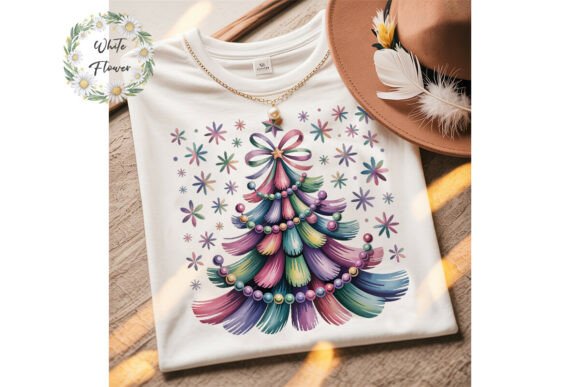
A Pastel Christmas Tree Sublimation Design is more than seasonal decoration—it’s a production-ready digital asset built for real-world output. Designed specifically for sublimation printing, this file delivers soft, muted holiday charm with technical precision: a single high-resolution PNG at 300 dpi, fully transparent background, and scalable dimensions (up to 4500 pixels or 15 inches on the longest side). Its commercial license means it integrates directly into your workflow—no licensing guesswork, no delays waiting for permissions.
This isn’t a generic clipart download. It’s engineered for function: the transparency allows seamless layering over textured substrates like mugs, tote bags, or ceramic tiles; the resolution ensures crisp detail even when printed large on apparel or home décor; and the pastel palette—think blush pinks, mint greens, buttery yellows, and dusty lavenders—aligns with current design trends without sacrificing versatility. That balance of aesthetic appeal and technical readiness is what makes it valuable across multiple stages of a project lifecycle.
Where It Fits in Your Creative or Production Workflow
Think of the Pastel Christmas Tree Sublimation Design as a modular component—not a standalone solution, but a reliable piece you pull in when needed. It works before production begins (as a visual anchor during mockup planning), during execution (as the central graphic in your print layout), and even after launch (as part of a repeatable holiday collection system).
Before printing, use it to test color fidelity on your target substrate. Load it into your RIP software alongside your base material profile—especially important if you’re working with polyester-coated ceramics or blended fabrics. The transparency eliminates guesswork about background bleed or unwanted white edges. During design assembly, drop it into Canva, Adobe Illustrator, or Cricut Design Space alongside custom text, borders, or secondary motifs. Because it’s a single-layer PNG, it avoids complex vector nesting or font compatibility issues that can stall production.
After finalizing a product line, retain the original file—but also save modified versions with clear naming conventions (e.g., “pastel-tree-mug-2024-v2”, “pastel-tree-tote-cropped”). This supports version control, reduces rework, and builds internal consistency across seasonal drops.
Integration With Common Tools and Platforms
The file’s format and specs make integration frictionless. In Print-on-Demand (POD) workflows, upload it directly to platforms like Printful, Gooten, or Redbubble. No conversion needed—the 300 dpi resolution meets most POD requirements, and the transparent background aligns with their cutline expectations. For physical production, import it into Sawgrass Print Manager or ChromaBlast Studio without resampling warnings.
If you're using design tools like Affinity Designer or Inkscape, place the PNG as a raster layer beneath vector elements—ideal for adding foil accents, embossed textures, or gradient overlays. For educators or content creators building holiday-themed lesson kits or social media templates, embed it into Google Slides or Notion pages as a reusable brand element. Its pastel tone pairs well with neutral backgrounds, making it legible in both light and dark mode previews.
Practical Implementation Tips
Start with substrate testing. Pastel tones behave differently on white vs. off-white blanks. Print a small test batch on your most-used mug or ornament blank first. Note how mint green shifts on ceramic versus polyester fabric—you may need minor saturation tweaks before scaling up.
Modify intentionally—not just for change’s sake. Since customization is allowed, consider targeted adjustments: flip the tree horizontally to create mirrored sets, reduce opacity slightly for a watercolor wash effect, or add subtle noise texture to soften edges for fabric applications. Avoid over-editing—preserving the original clarity keeps the design legible at smaller sizes (e.g., on ornaments or keychains).
Organize for reuse. Store the original file in a dedicated “Sublimation Assets/Christmas” folder, separate from modified versions. Include a simple README.txt listing usage rights, dimensions, and permitted edits. This saves time during tax season audits or client handoffs—and reinforces responsible asset management.
Batch your modifications. If you’re preparing for multiple products (mugs, shirts, notebooks), open all required templates first, then drag the same PNG into each. Adjust sizing uniformly—use percentage-based scaling instead of pixel values to maintain proportional integrity across formats.
Quality Control and Long-Term Use
Because this is a one-time purchase with instant download, quality assurance starts the moment you receive the file. Verify the resolution (right-click → Properties → Details tab on Windows; Get Info on Mac), confirm transparency (open in Preview or Paint.NET and check for checkerboard background), and ensure no embedded metadata conflicts with your branding guidelines.
For long-term viability, avoid saving edited versions as flattened JPEGs—retain PNG or PSD files with layers intact. This preserves editability if you later expand into new product categories (e.g., adding heat-transfer vinyl variants or embroidery digitization). Also, revisit the design every 12–18 months: compare it against current trend reports (Pantone’s Holiday Palette, WGSN seasonal forecasts) to assess whether tonal updates—like swapping sage for seafoam—would extend its shelf life.
Consistency matters beyond visuals. Apply the same naming logic, folder structure, and versioning rules to all sublimation assets—not just this one. That discipline compounds over time: when you add a pastel snowflake or candy cane set next season, they’ll slot in cleanly, reducing cognitive load and minimizing setup time per launch.
What You Receive—and Why It Matters
You get one clean PNG file—no zipped folders, no hidden layers, no confusing license documents buried in PDFs. Just immediate access to a production-grade asset. That simplicity serves a purpose: it removes friction between idea and execution. Whether you’re prototyping a holiday merch line before Black Friday, prepping classroom materials for December lessons, or building a limited-edition Etsy collection, the absence of administrative overhead lets you focus on outcomes—not file management.
The commercial license isn’t boilerplate—it’s operational clarity. You’re explicitly allowed to use it in printed goods, POD products, and original modified designs. What’s prohibited—reselling the raw file, distributing it as a freebie—is equally clear. That transparency eliminates legal ambiguity, which matters when you’re negotiating wholesale contracts or submitting to craft fairs with strict IP policies.
If something goes wrong—corrupted download, incorrect resolution, missing transparency—support is built into the process. A quick message triggers direct assistance, not automated replies. That responsiveness reflects how the asset functions in practice: as part of a human-centered workflow, not a transactional exchange.
When you choose a Pastel Christmas Tree Sublimation Design, you’re selecting for reliability, adaptability, and alignment with how work actually gets done—not just holiday aesthetics. It supports planning, accelerates execution, and scales with your growth—whether you’re launching your first Etsy shop or managing seasonal campaigns for a multi-location boutique.