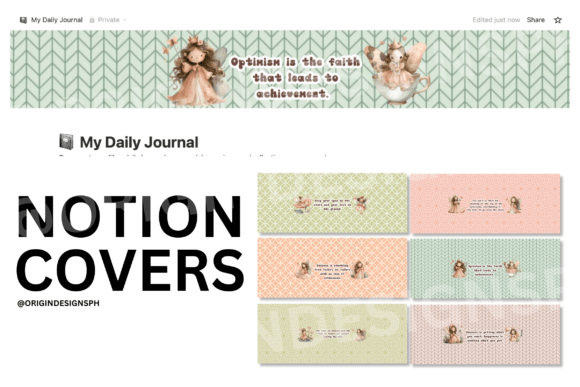
Notion Cover
Your Notion dashboard is more than a collection of pages—it’s the operational center for your thinking, planning, and doing. The Notion Cover sits at the top of each page like a visual anchor: it’s the first thing you see when opening a database, project tracker, course syllabus, client brief, or personal journal. It’s not decoration for decoration’s sake. It’s functional framing—setting tone, signaling priority, and reinforcing intention before you’ve read a single line of content.
A well-chosen Notion Cover supports cognitive clarity. When your eyes land on a clean, high-resolution cover that matches your current focus—say, a muted gradient for a deep-work sprint or a bold geometric pattern for a product launch roadmap—you’re subtly cueing your brain into the right mode. That shift matters. It reduces friction between intention and action, especially when switching contexts across work, learning, and personal life.
Where the Notion Cover Fits in Your Real Workflow
Think of the Notion Cover as part of your setup ritual—not an afterthought, but a deliberate pre-step. Before starting a new client project, you might select a cover with subtle branding elements (colors, fonts, or minimal icons) to visually align the page with your service offering. During a quarterly review, you might use a cover with calendar-inspired motifs or soft data-visualization textures to reinforce time-based reflection. After completing a course module, a celebratory or minimalist cover can serve as a quiet milestone marker—no fanfare needed, just consistency in closure.
This isn’t about aesthetics alone. It’s about alignment. A Notion Cover works alongside your page title, icon, and structure to form a unified information layer. It interacts directly with how you navigate, search, and return to pages—especially in large workspaces where visual scanning beats scrolling through text-heavy lists. In shared team spaces, consistent covers help members quickly identify document types: blue-toned for SOPs, green for active sprints, amber for archived references.
Compatibility and Practical Integration
All Notion Covers in our collection are built to Notion’s native dimensions: 1920×1080 pixels (16:9), optimized for both desktop and mobile viewing. They load instantly, scale cleanly, and avoid pixelation or cropping—even when resized or zoomed. No extra plugins, no custom CSS, no manual adjustments. You paste the image URL into the cover field, and it fits.
That compatibility extends beyond Notion itself. If you embed a Notion page into a website, Slack message, or internal wiki, the cover remains visible and legible. When exporting to PDF or sharing via public links, the cover stays intact—supporting brand cohesion across touchpoints. And because these are high-resolution JPEGs and PNGs (no watermarks, no compression artifacts), they hold up in printed formats too—useful if you occasionally print weekly planners, pitch decks, or workshop handouts from Notion exports.
How to Choose—and Use—Your Notion Cover Intentionally
Start by asking: What do I want this page to communicate before I read anything else?
- Clarity over flair: A busy cover competes with your content. Prioritize contrast, negative space, and readable typography overlays—if you plan to add text on top.
- Consistency within context: Use similar tones or styles for related pages (e.g., all “Client Onboarding” databases share a cohesive palette), but vary them enough to distinguish categories at a glance.
- Function before form: A dark-mode cover may look sleek—but test it with your actual Notion theme. Some light-on-dark designs reduce readability when overlaid with white text blocks or toggle headers.
You don’t need a different cover for every page. A small, intentional set—say, five core styles—can cover most use cases: one for active projects, one for reference docs, one for learning resources, one for personal goals, and one for archived material. Rotate them deliberately, not randomly.
Long-Term Usability and Quality Control
Over time, your Notion workspace evolves. Pages get archived, duplicated, repurposed. A good Notion Cover supports that evolution. Avoid overly specific imagery (e.g., dated illustrations, seasonal motifs, or branded logos you may retire) unless the page itself is time-bound. Timeless design choices—subtle gradients, organic textures, restrained patterns—age gracefully and remain relevant across quarters and years.
Also consider accessibility. While Notion doesn’t currently support alt text for covers, high-contrast options and uncluttered compositions improve usability for screen readers and low-vision users navigating your shared spaces. We prioritize those qualities in every design.
What You Can—and Cannot—Do With These Covers
These are digital assets intended for direct use in Notion. You may:
- Upload them to your own Notion pages, databases, or templates.
- Use them in printed materials you produce—like bound planners, workshop kits, or physical dashboards—via services like Printful, Printify, Gelato, RedBubble, or Amazon KDP.
- Sell printed hard copies to your customers, as long as the digital file itself is never distributed, shared, resold, or given away—even as a “free bonus” or lead magnet.
You may not:
- Sell or distribute the digital files in any format (ZIP, PNG bundle, Google Drive link, etc.).
- Offer them as free downloads, email attachments, or bundled resources—even with attribution.
- Upload them to platforms where customers can download the original digital file (e.g., Gumroad, Etsy digital listings, or Creative Market).
This ensures fair use, respects creator rights, and maintains quality control. Every cover is crafted to perform well in Notion—not as standalone art, but as working infrastructure.
Real Implementation Examples
For educators: A Notion Cover with soft chalkboard texture and faint grid lines sets the tone for lesson plans—visually distinct from student-facing handouts (which use cleaner, brighter covers). When building a course database, matching covers across modules signal progression and unity without needing extra navigation labels.
For freelancers: Before sending a proposal Notion page to a client, swap in a cover with your logo watermark and brand colors—subtle, professional, non-intrusive. Later, when archiving that project, switch to a neutral gray cover with “Completed” in small, centered type. No renaming, no reorganizing—just visual status updating.
For solopreneurs tracking multiple income streams: Assign unique cover palettes to each revenue source (e.g., warm tones for coaching, cool tones for digital products, monochrome for affiliate work). At a glance, your dashboard becomes a real-time health check—not just a list of pages, but a color-coded pulse of your business.
In each case, the Notion Cover isn’t changing what you do—it’s making the doing smoother, clearer, and more sustainable.
Final Thought: It’s Infrastructure, Not Ornament
Treat your Notion Cover like a well-designed door handle: unnoticed when it works, frustrating when it doesn’t. It should support flow, not interrupt it. It should reflect your process—not distract from it. When chosen and applied with intention, it becomes part of your workflow’s rhythm: a silent cue, a consistent frame, a small but meaningful upgrade in how you show up to your own work every day.
Our collection is built for that purpose—no fluff, no filler, no forced trends. Just high-resolution, Notion-optimized covers that integrate cleanly, scale reliably, and support your real-world execution—whether you’re drafting a blog post, managing a team sprint, studying for certification, or planning next year’s goals.