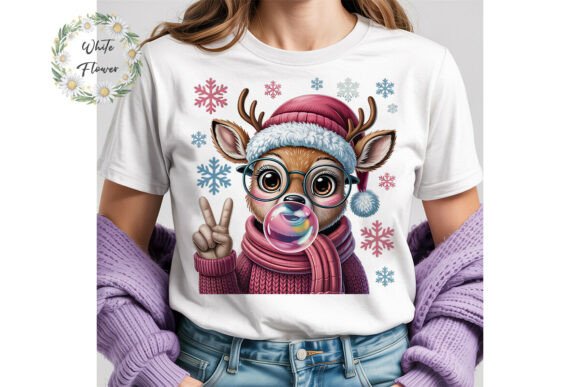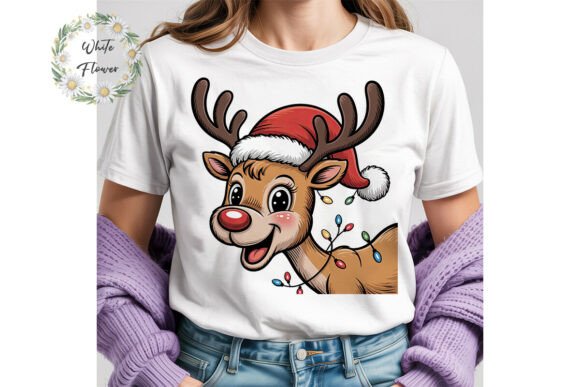
Cute Christmas Reindeer PNG Clipart
When you’re designing holiday-themed materials—whether for a small business launch, classroom activity, blog post, or print-on-demand product—the right visual asset can accelerate your workflow, elevate professionalism, and reinforce seasonal messaging without extra design overhead. The Cute Christmas Reindeer PNG Clipart is built for that precise moment: when you need high-quality, production-ready artwork that integrates cleanly into your existing tools and timeline.
This isn’t just another festive graphic. It’s a single, meticulously prepared 300 dpi PNG file with a transparent background—4500 pixels on the longest side (15 inches at print resolution or smaller). That means it scales crisply across digital screens and physical prints alike, whether you’re placing it on a greeting card, embedding it in a Canva social media template, layering it in Adobe Photoshop, or exporting it for embroidery digitizing software. Its transparency eliminates tedious background removal, saving time during layout and ensuring clean compositing over photos, gradients, or textured backgrounds.
How It Fits Into Real Creative Workflows
For creators who juggle multiple platforms and output formats, compatibility isn’t optional—it’s foundational. The Cute Christmas Reindeer PNG Clipart works immediately inside common design environments: Figma, Illustrator, Affinity Designer, Procreate, PowerPoint, Google Slides, and even basic editors like Preview or Paint.NET. No conversion needed. No color profile surprises. No resolution drop-offs when scaling down for web thumbnails or up for large-format signage.
Consider a small business owner preparing holiday packaging labels. They import the reindeer clipart directly into their label-making software (e.g., NiceLabel or Maestro Label Designer), resize it to fit a 3-inch circular die-cut area, adjust opacity for subtle watermarking, and export—no rasterization artifacts, no pixelation. Or an educator building a December-themed lesson plan: they drag the file into a Google Slides presentation, group it with text boxes and icons, then download as PDF for student handouts—all while retaining full clarity at 100% zoom.
Preparation and Setup: What You Need Before Importing
Before dropping the clipart into your project, consider three practical checks:
- Color mode alignment: While the file is RGB (ideal for screen use), confirm your final output destination. If printing commercially, verify whether your printer requires CMYK conversion—and whether your design app handles that automatically (e.g., InDesign does; Canva doesn’t). For most POD services like Printful or Redbubble, RGB is preferred and expected.
- Layer organization: When customizing, duplicate the original layer before applying filters, recoloring, or masking. This preserves editability and lets you revert quickly if a version doesn’t land as intended.
- File naming and storage: Rename the downloaded file immediately—for example, “reindeer-cute-300dpi-transparent-v1.png”—and store it in a clearly labeled “Holiday Assets” folder alongside related SVGs, fonts, and color palettes. Consistent naming prevents version confusion later, especially when collaborating or revisiting projects months after launch.
Customization That Scales With Your Needs
The license explicitly permits modification—so treat the reindeer not as a static image, but as a flexible base element. You might:
- Add a scarf or earmuffs using vector shapes in Illustrator, then export the entire composition as a new PNG.
- Apply duotone effects in Photoshop to match your brand palette—say, forest green and cream—then save as a style preset for reuse across other holiday assets.
- Isolate parts of the reindeer (e.g., antlers only) via selection tools and repurpose them as bullet points or section dividers in a newsletter layout.
- Use it as a mask in After Effects to reveal animated snowfall behind the character—ideal for short-form video content on Instagram or TikTok.
Because the file is delivered at 300 dpi and 4500 pixels wide, resizing down to 600 pixels for web banners introduces zero quality loss. But more importantly, it gives headroom: if your printer requests a minimum 300 dpi at 12 inches wide, this file clears that threshold with room to spare—no interpolation, no softening.
Integration With Broader Production Systems
In team-based or multi-stage workflows, consistency hinges on shared assets. If you’re managing a holiday campaign across email, social, and physical retail displays, this reindeer clipart becomes a unifying visual thread. Drop it into your brand’s Figma library as a component, assign it a semantic name (“Holiday–Reindeer–Primary”), and set usage guidelines (e.g., “Always paired with #E8C9A7 for warmth”). That way, freelancers, interns, or contractors apply it uniformly—even if they’ve never touched the original file.
For print-on-demand sellers, integration extends beyond design: because commercial use is permitted *as part of your original, modified design*, you can combine the reindeer with hand-lettered phrases, watercolor textures, or geometric borders—then upload the composite to Teespring, Zazzle, or Etsy without licensing risk. Just ensure the final product reflects clear creative authorship—not a straight copy-paste.
What to Avoid—And Why It Matters
The license prohibits reselling or redistributing the file in its original form. That’s not arbitrary—it protects both you and the creator. If someone else shares the raw PNG, its metadata, embedded color profiles, or compression history may shift unpredictably across platforms, leading to inconsistent output in *your* projects. More critically, widespread redistribution dilutes uniqueness. Your holiday collection stands out because you tailored it—not because dozens of others used the same untouched file.
Similarly, giving it away as a freebie risks downstream misuse. A well-intentioned blogger might bundle it into a “Free Holiday Bundle” ZIP, only for users to extract and deploy it without attribution or awareness of usage limits. Keeping control over distribution maintains integrity across your ecosystem.
Long-Term Usability and Version Management
This reindeer clipart isn’t tied to a specific year or trend—it avoids dated typography, hyper-specific fashion, or culturally narrow references. Its simplicity and warmth make it reusable across multiple holiday seasons. To extend its lifespan:
- Save modified versions with date stamps (e.g., “reindeer-cute-2024-scarf-v2.png”) rather than overwriting originals.
- Document changes in a brief Notion or Excel log: “Added gold foil texture, 12/3/2024, used in 2024 gift tag series.”
- Archive older versions—but keep the master file accessible in cloud storage with version history enabled (e.g., Dropbox or Google Drive).
Should you ever need support—say, a corrupted download or unexpected transparency artifact—help is one message away. That responsiveness matters when deadlines loom and troubleshooting can’t wait for forum replies or generic KB articles.
If this asset fits your current or upcoming work, take advantage of the instant download. There’s no waiting for approval, no manual file assembly, no subscription lock-in. Just one clean, production-grade file—ready to slot into your next step, whether that’s finalizing a client proposal, prepping a classroom activity, or launching a limited-edition holiday product line.
And if it delivers value? A quick review helps others discover it faster—and supports the continued creation of reliable, ethically licensed assets like this one.