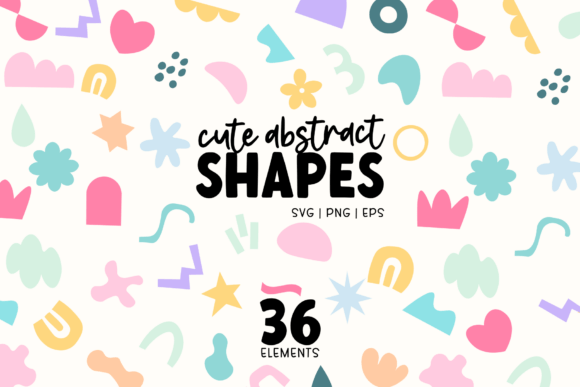
36 Cute Abstract Shapes SVG Bundle
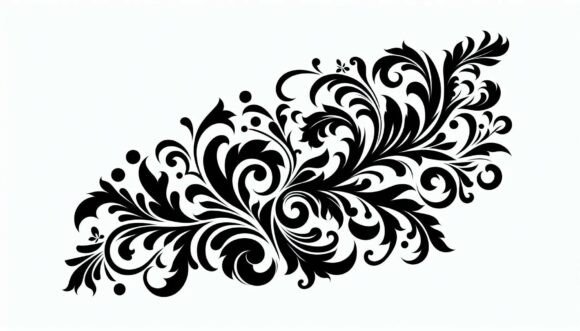
Design doesn’t always begin with a blank canvas—it often starts with a single element that sparks movement, rhythm, or tone. The 36 Cute Abstract Shapes SVG Bundle is built for that moment: when you need a subtle lift in visual personality without overhauling your entire layout. It’s not a full template or a design system—but rather a curated set of expressive, hand-drawn elements that slot naturally into existing workflows across digital and print environments.
These aren’t rigid icons or generic vectors. Each shape carries gentle irregularity—slightly wobbly curves, soft corners, uneven line weights—that signals approachability and warmth. That intentionality matters when building brand consistency, especially for small businesses and independent creators who rely on visual cohesion across platforms but lack time for custom illustration from scratch.
Where This Bundle Fits Into Your Creative Process
The 36 Cute Abstract Shapes SVG Bundle works at multiple points in a project lifecycle—not just as decoration, but as a functional asset that supports planning, execution, and refinement.
Before a project begins, it helps define visual tone. If you’re drafting a new Canva social media calendar or sketching packaging concepts, dropping in a few of these shapes during moodboarding gives immediate feedback on whether “playful but professional” or “soft but modern” lands the way you intend. Their colour flexibility (editable directly in Canva via SVG) means you can test palettes early—without exporting or re-importing.
During active design work, they serve as modular accents: framing text blocks, separating sections in digital scrapbooks, adding dimension to product mockups, or anchoring sublimation designs on mugs or tote bags. Because each SVG is fully editable—including stroke weight, fill opacity, and anchor points—you can scale, rotate, recolour, or layer them without quality loss. No pixelation. No guesswork.
After finalising layouts, the included high-resolution PNGs (300dpi, transparent background) let you export cleanly for print-on-demand services like Printful or Gelato, or embed directly into PDF-based journals and printable planners. The EPS file—containing all 36 shapes on one artboard—makes batch adjustments in Illustrator efficient: align, group, or apply global effects in seconds.
Integration Across Tools and Platforms
Compatibility isn’t theoretical here—it’s tested and practical. In Canva, upload the SVGs and use the “Edit Colour” option to match brand hex codes instantly. No need to download external editors just to tweak a pastel pink into coral. In Adobe Illustrator, expand appearances and manipulate paths freely—ideal if you’re combining shapes into custom dividers or logo submarks. For Cricut Design Space, the clean vector paths cut precisely on machines, making them reliable for vinyl stickers or iron-on transfers.
Even outside design software, the bundle supports broader business workflows. Educators use the shapes to build engaging slide decks or printable classroom resources. Bloggers insert them into Notion dashboards or email headers to reinforce voice without heavy branding overhead. Small business owners drop them into Shopify product pages—not as focal points, but as quiet visual cues that signal care and craft.
Practical Tips for Smooth Implementation
- Start small. Pick three shapes that complement your current palette and apply them consistently across two assets—say, an Instagram story template and a printable checklist. Observe how they affect perceived tone before scaling usage.
- Use the Sunberry Blush freebie intentionally. This exclusive shape stands out with its layered blush gradient and organic silhouette. Reserve it for hero placements—like the top corner of a pitch deck cover or the focal point of a limited-edition product label.
- Organise by function, not just appearance. Create folders in your design library named “Dividers”, “Accents”, and “Frames”. Drag matching shapes into each based on how they behave in layout—not how they look alone. This speeds up future selection.
- Leverage transparency smartly. The PNGs include alpha channels, so they sit cleanly over photos, gradients, or textured backgrounds. Try overlaying a soft geometric form at 15% opacity behind body text in a digital planner—it adds depth without competing for attention.
Long-Term Use and Consistency
Because these shapes are hand-designed—not algorithmically generated—they hold up over time. You won’t see identical forms appearing in stock libraries or competitor materials. That uniqueness supports long-term brand recognition, especially when used as recurring motifs: a particular wiggly line as a section divider across blog posts, or a rounded blob as a consistent bullet style in client presentations.
Consistency also comes from how easily the files integrate into version control or team handoffs. Since all formats (SVG, PNG, EPS) are included and clearly named, handing off assets to a freelance designer or print vendor requires no clarification. There’s no ambiguity about resolution, transparency, or editability—just clarity and readiness.
Real-World Applications by Role
Freelancers use the bundle to add polish to client deliverables without extending timelines—inserting a custom shape into a Canva presentation or embedding one into a Figma prototype saves hours versus commissioning bespoke illustrations.
Educators and course creators layer shapes behind quote cards or module headers in digital workbooks. The playful aesthetic lowers cognitive load for learners while maintaining professionalism—especially effective in wellness, creativity, or early education niches.
Print-on-demand sellers combine shapes with typography to create evergreen designs for mugs, notebooks, or phone cases. The commercial-use license means no legal review needed before uploading to Redbubble or Teespring—just design, test, launch.
Hobbyists and journalers print the PNGs onto sticker paper or use them digitally in GoodNotes or Notion. Their soft geometry pairs well with handwritten notes, watercolour scans, or minimalist layouts—adding interest without clutter.
Why Quality Control Starts With Intentional Design
Every shape in the 36 Cute Abstract Shapes SVG Bundle was drawn with deliberate imperfection—no symmetrical circles, no mathematically perfect arcs. That’s not a limitation; it’s a feature. It ensures the elements feel human-made, not AI-generated. That distinction matters when audiences increasingly respond to authenticity over polish.
Each file was also tested across devices and export settings: no stray anchor points, no hidden layers, no embedded fonts. What you see in Illustrator is what prints on your home printer or renders in Canva’s mobile app. That reliability reduces revision loops and builds trust in your own process.
Created by Okay Doodle—a UK-based studio focused on supporting small creative businesses—the bundle reflects a deeper understanding of what working designers actually need: tools that accelerate output without sacrificing voice, assets that simplify decisions instead of multiplying options, and resources that grow more useful the longer you use them.
If your workflow involves balancing speed, personality, and professionalism, the 36 Cute Abstract Shapes SVG Bundle fits quietly but meaningfully into the gaps where design energy tends to stall—between concept and execution, between draft and delivery, between good enough and truly joyful.